The best OCR for Cyrillic alphabet texts with math and science
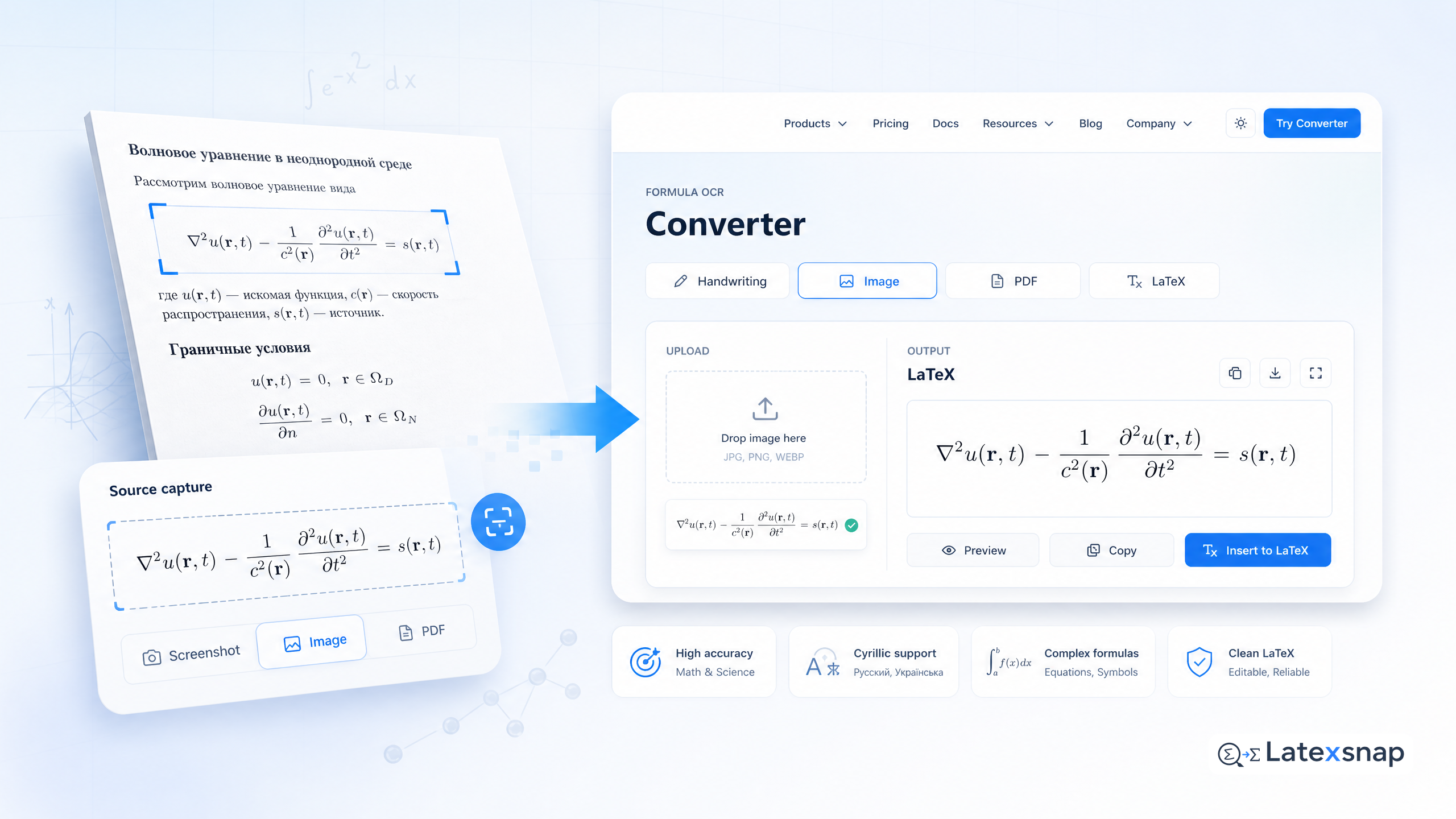
If you are a student, researcher, educator, or technical writer, you know that working with equations and formulas can be a pain. Whether you are trying to read a paper, write a report, or create a presentation, you often have to deal with images, PDFs, or handwritten notes that contain complex mathematical expressions.
You might think that converting these images to editable text is easy, but it is not. Many OCR (optical character recognition) tools struggle with Cyrillic alphabet texts, especially when they involve math and science. They either fail to recognize the characters correctly or produce garbled output that is hard to read and edit.
That is why you need a formula OCR tool that can handle Cyrillic characters with precision and accuracy. A formula OCR tool is a type of OCR that is designed to convert images of mathematical formulas and equations into editable formats, such as LaTeX, MathML, HTML, AsciiMath, SVG, and more. A formula OCR tool can also convert PDFs to editable Word files, Markdown, or HTML.
A formula OCR tool is the best tool for Cyrillic characters recognition, which can convert images to LaTeX, MathML, HTML, AsciiMath, SVG, and more. Moreover, with our web app you can digitize PDFs to editable Word file, a formula OCR tool Markdown, or HTML. Our products are developed specifically for STEM documents to save people time while creating content. A useful companion workflow is The best OCR for images and PDFs with Japanese characters and math, especially when document OCR workflow becomes part of the review process.
How to get started with a formula OCR tool
If you want to try a formula OCR tool for yourself, you can download our desktop and mobile apps here to start converting images in a split second. You can also use our web app to digitize PDFs.
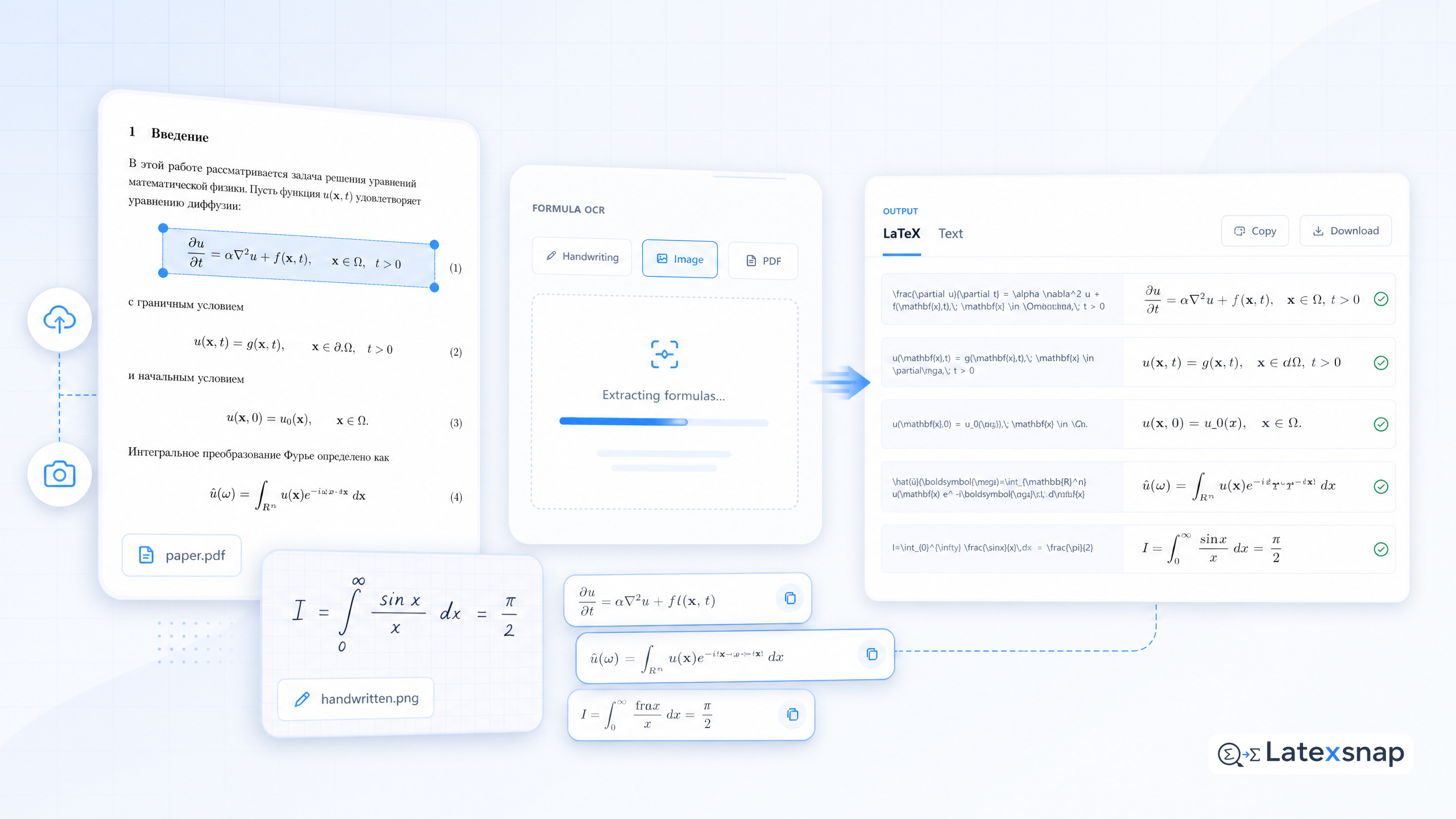
Our formula OCR tool is easy to use and requires no installation or registration. Just upload an image or a PDF file, and our AI-powered engine will convert it to your desired format in seconds. You can then download the output file or copy the text to your clipboard.
Our formula OCR tool supports various file formats, such as JPG, PNG, GIF, BMP, TIFF, PDF, DOCX, and more. You can also choose from multiple output formats, such as LaTeX, MathML, HTML, AsciiMath, SVG, Word, Markdown, and more. You can also customize the output options, such as font size, color, style, and more.
Why a formula OCR tool is better than other OCR tools
A formula OCR tool is not just another OCR tool that can recognize text. It is a specialized tool that can recognize and convert mathematical formulas and equations with high accuracy and fidelity. A formula OCR tool can handle various types of mathematical symbols, such as fractions, exponents, subscripts, integrals, sums, products, derivatives, limits, matrices, vectors, and more.
A formula OCR tool can also preserve the structure and layout of the original formula, such as alignment, spacing, indentation, and more. A formula OCR tool can also generate valid and consistent output in the target format, such as LaTeX, MathML, HTML, AsciiMath, SVG, and more.
A formula OCR tool is also more versatile and flexible than other OCR tools. A formula OCR tool can convert images to various output formats, such as LaTeX, MathML, HTML, AsciiMath, SVG, and more. A formula OCR tool can also convert PDFs to editable Word files, Markdown, or HTML.
A formula OCR tool is also more user-friendly and accessible than other OCR tools. A formula OCR tool can be used on any device, such as desktop, laptop, tablet, or smartphone. A formula OCR tool can also be accessed online or offline, depending on your preference.
How to use a formula OCR tool for bulk image or PDF conversion
If you have many images or PDFs that you want to convert to editable text, you can use our formula OCR tool API for bulk image or PDF conversion. Our formula OCR tool API is an easy-to-use and scalable solution that can be integrated into any application using a simple HTTP request.
Our formula OCR tool API supports various input and output formats, such as JPG, PNG, GIF, BMP, TIFF, PDF, DOCX, LaTeX, MathML, HTML, AsciiMath, SVG, Word, Markdown, and more. You can also customize the output options, such as font size, color, style, and more. If you want to compare this with another practical angle, PDF to LaTeX Converter Workflow covers document OCR workflow in more detail.
Our formula OCR tool API also provides various features and benefits, such as:
- Fast and reliable conversion: Our formula OCR tool API uses advanced AI algorithms and deep learning models to convert images and PDFs to editable text in seconds. Our formula OCR tool API also ensures high accuracy and fidelity of the output, with minimal errors and artifacts.
- Secure and private conversion: Our formula OCR tool API uses encryption and authentication to protect your data and privacy. Our formula OCR tool API also complies with various standards and regulations, such as GDPR, HIPAA, ISO 27001, and more.
- Affordable and flexible pricing: Our formula OCR tool API offers various pricing plans and options to suit your needs and budget. Our formula OCR tool API also allows you to pay only for what you use, with no hidden fees or charges.
- Support and documentation: Our formula OCR tool API provides comprehensive documentation and support to help you get started and solve any issues. Our formula OCR tool API also has a community of users and developers who can share their experiences and tips.
How to improve the quality and accuracy of your formula OCR results
Although our formula OCR tool is very powerful and accurate, it is not perfect. There are some factors that can affect the quality and accuracy of your formula OCR results, such as:
- Image quality: The clarity, resolution, contrast, and noise level of the image can affect how well our formula OCR tool can recognize and convert the formula. A blurry, low-resolution, dark, or noisy image can reduce the quality and accuracy of the output.
- Formula complexity: The complexity, length, and structure of the formula can affect how well our formula OCR tool can recognize and convert the formula. A complex, long, or nested formula can increase the difficulty and error rate of the output.
- Formula ambiguity: The ambiguity, similarity, and variation of the formula can affect how well our formula OCR tool can recognize and convert the formula. An ambiguous, similar, or variable formula can cause confusion and mistakes in the output.
- Formula context: The context, language, and domain of the formula can affect how well our formula OCR tool can recognize and convert the formula. An unfamiliar, foreign, or specialized formula can challenge our formula OCR tool's knowledge and understanding.
To improve the quality and accuracy of your formula OCR results, you can follow some tips and best practices, such as:
- Crop and enhance the image: You can crop the image to remove any unnecessary or distracting elements, such as borders, shadows, watermarks, or text. You can also enhance the image to improve its clarity, resolution, contrast, and noise level, such as by resizing, sharpening, brightening, or denoising.
- Simplify and standardize the formula: You can simplify the formula to reduce its complexity, length, and structure, such as by breaking it down into smaller parts, removing redundant or irrelevant elements, or using simpler or more common symbols. You can also standardize the formula to make it more consistent and uniform, such as by using the same font, size, style, and color for all elements.
- Clarify and specify the formula: You can clarify the formula to make it more clear and distinct, such as by adding labels, annotations, or explanations to indicate the meaning, purpose, or function of the formula. You can also specify the formula to make it more precise and definite, such as by using exact values, units, or ranges instead of approximate or vague ones.
- Provide and verify the context: You can provide the context to make it more relevant and informative, such as by adding metadata, tags, or keywords to describe the source, topic, or category of the formula. You can also verify the context to make it more accurate and reliable, such as by checking the validity, correctness, or consistency of the formula with the context.
How to review and edit your formula OCR output
Although our formula OCR tool is very accurate and reliable, it is not infallible. There are some cases where our formula OCR tool may produce some errors or inconsistencies in the output, such as:
- Missing or extra characters: Our formula OCR tool may miss some characters or add some extra characters that are not in the original formula, such as by omitting some symbols, duplicating some symbols, or inserting some symbols that are not needed.
- Wrong or incorrect characters: Our formula OCR tool may recognize some characters incorrectly or incorrectly, such as by mistaking some symbols for others, reversing some symbols, or changing some symbols to different ones.
- Misaligned or misplaced characters: Our formula OCR tool may align or place some characters incorrectly or incorrectly, such as by shifting some symbols to the wrong position, rotating some symbols to the wrong angle, or flipping some symbols to the wrong direction.
- Invalid or inconsistent structure: Our formula OCR tool may generate some invalid or inconsistent structures in the output, such as by breaking some rules, violating some conventions, or creating some conflicts.
To review and edit your formula OCR output, you can use various tools and methods, such as:
- Visual inspection: You can visually inspect the output to compare it with the original formula and identify any errors or inconsistencies. You can also use various tools and techniques to enhance your visual inspection, such as by zooming in, zooming out, rotating, flipping, or highlighting some parts of the output.
- Syntax checking: You can use syntax checking tools to verify the validity and consistency of the output syntax. You can also use various tools and techniques to improve your syntax checking, such as by using linters, validators, parsers, or compilers to check the output syntax against some standards or rules.
- Semantic checking: You can use semantic checking tools to verify the meaning and correctness of the output semantics. You can also use various tools and techniques to improve your semantic checking, such as by using interpreters, evaluators, solvers, or verifiers to check the output semantics against some values or results.
- Manual editing: You can manually edit the output to correct any errors or inconsistencies that you find. You can also use various tools and techniques to facilitate your manual editing, such as by using editors, converters, formatters, or renderers to edit, convert, format, or render the output.
Conclusion
If you are looking for the best OCR for Cyrillic alphabet texts with math and science, you should consider using a formula OCR tool. A formula OCR tool is a specialized tool that can convert images of mathematical formulas and equations into editable formats, such as LaTeX, MathML, HTML, AsciiMath, SVG, and more. A formula OCR tool can also convert PDFs to editable Word files, Markdown, or HTML. For a related next step on document OCR workflow, see The best OCR for Hindi images and PDFs with math and science.
A formula OCR tool is the best tool for Cyrillic characters recognition, which can convert images to LaTeX, MathML, HTML, AsciiMath, SVG, and more. Moreover, with our web app you can digitize PDFs to editable Word file, a formula OCR tool Markdown, or HTML. Our products are developed specifically for STEM documents to save people time while creating content.
If you want to try a formula OCR tool for yourself, you can download our desktop and mobile apps here to start converting images in a split second. You can also use our web app to digitize PDFs. When the document pipeline gets more complex, How to Write Fractions in LaTeX gives more context on LaTeX editing workflow.
Our formula OCR tool is easy to use and requires no installation or registration. Just upload an image or a PDF file, and our AI-powered engine will convert it to your desired format in seconds. You can then download the output file or copy the text to your clipboard. For teams extending this workflow, Image to LaTeX workflow is a natural follow-up for formula OCR workflow.
Our formula OCR tool supports various file formats, such as JPG, PNG, GIF, BMP, TIFF, PDF, DOCX, and more. You can also choose from multiple output formats, such as LaTeX, MathML, HTML, AsciiMath, SVG, Word, Markdown, and more. You can also customize the output options, such as font size, color, style, and more.
If you have many images or PDFs that you want to convert to editable text, you can use our formula OCR tool API for bulk image or PDF conversion. Our formula OCR tool API is an easy-to-use and scalable solution that can be integrated into any application using a simple HTTP request.
Our formula OCR tool API supports various input and output formats, such as JPG, PNG, GIF, BMP, TIFF, PDF, DOCX, LaTeX, MathML, HTML, AsciiMath, SVG, Word, Markdown, and more. You can also customize the output options, such as font size, color, style, and more.
Our formula OCR tool API also provides various features and benefits, such as:
- Fast and reliable conversion: Our formula OCR tool API uses advanced AI algorithms and deep learning models to convert images and PDFs to editable text in seconds. Our formula OCR tool API also ensures high accuracy and fidelity of the output, with minimal errors and artifacts.
- Secure and private conversion: Our formula OCR tool API uses encryption and authentication to protect your data and privacy. Our formula OCR tool API also complies with various standards and regulations, such as GDPR, HIPAA, ISO 2700
Convert formulas faster
Turn screenshots, handwriting, and PDFs into editable LaTeX.
