PDF to LaTeX Converter Workflow

If you work with academic papers, technical reports, or research documents, you know how frustrating it can be to convert PDF files into LaTeX format. Whether you're a student, researcher, educator, or technical writer, having a reliable PDF to LaTeX converter can save you hours of manual work. In this guide, we'll walk you through a practical workflow for converting PDFs to LaTeX using LatexSnap, a powerful equation OCR tool designed for students, researchers, educators, and technical writers. For a related next step on document OCR workflow, see PDF to LaTeX Converter: Best Tools and Techniques.
Why Convert PDFs to LaTeX?
PDFs are great for sharing and viewing documents, but they're not ideal for editing. LaTeX, on the other hand, is the gold standard for typesetting scientific and technical documents. It offers precise control over formatting, especially for equations, figures, and complex layouts. Converting a PDF to LaTeX allows you to:
- Edit and customize content easily
- Reproduce professional-quality documents
- Integrate seamlessly with academic workflows
However, manually retyping content from a PDF is time-consuming and error-prone. That's where LatexSnap comes in.
Step 1: Prepare Your PDF
Before converting your PDF, it's important to ensure the document is in good condition. Here are a few tips:
- Crop and clean the document: Remove unnecessary margins, headers, or footers that might interfere with the conversion.
- Ensure high-quality images: If your PDF contains scanned images or screenshots, make sure they're clear and legible. Blurry or low-resolution images can lead to inaccurate conversions.
- Check for ambiguous symbols: Some mathematical symbols or handwriting might be difficult for the OCR tool to recognize. If possible, clarify these before conversion.
Step 2: Upload Your PDF to LatexSnap
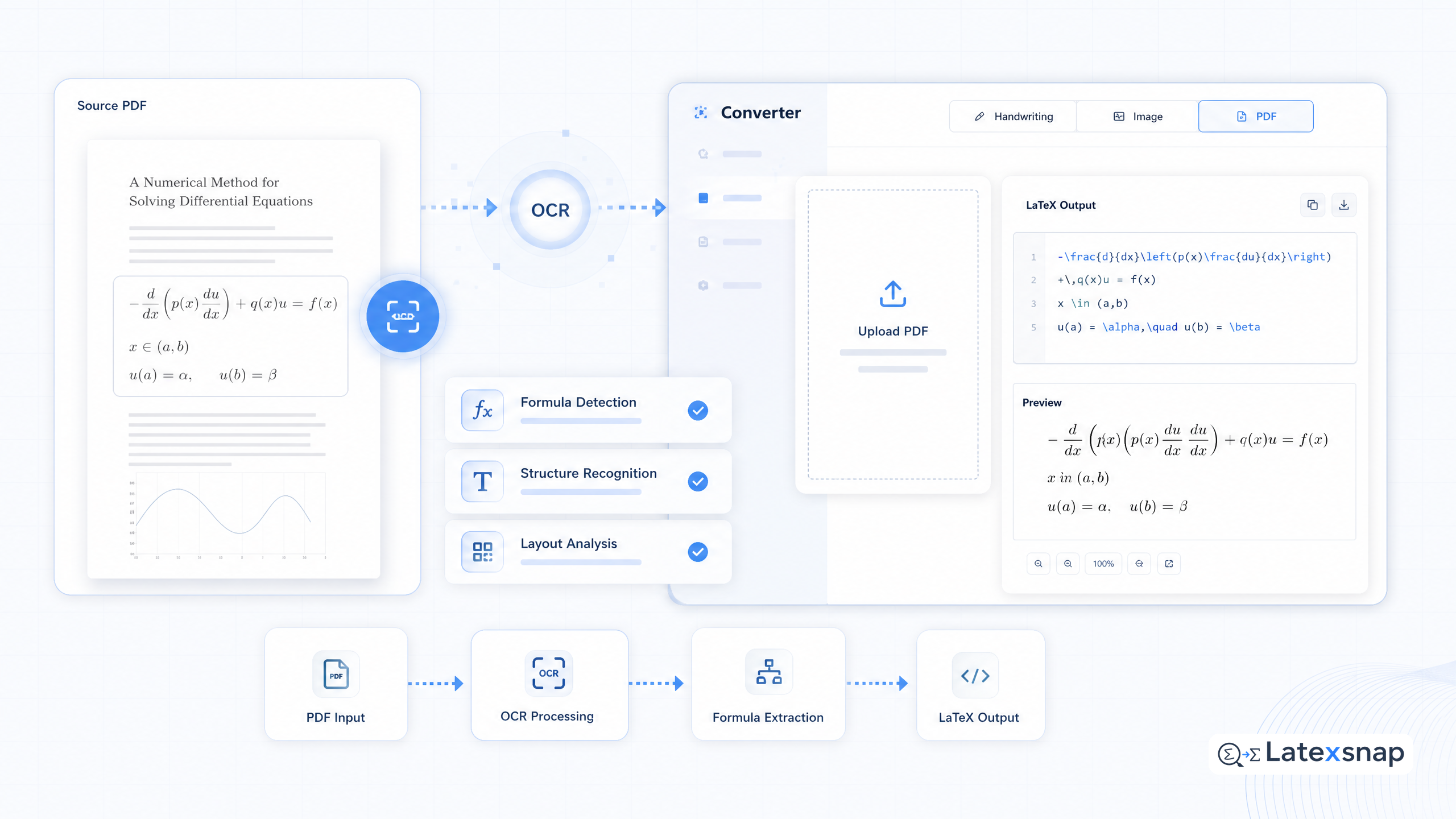
LatexSnap is an equation OCR tool that excels at converting equation images, handwriting, screenshots, and PDF formula snippets into editable LaTeX. To get started: If you want to compare this with another practical angle, Image to TikZ Converter for Equation OCR covers LatexSnap workflow in more detail.
- Visit the LatexSnap website.
- Upload your PDF file or select specific pages containing equations or formulas.
- Choose the OCR mode that best fits your document type (e.g., handwritten, printed, or mixed).
LatexSnap will process your file and extract the LaTeX code, making it easy to edit and integrate into your document.
Step 3: Review and Refine the LaTeX Output
While LatexSnap is highly accurate, it's always a good idea to review the generated LaTeX code. Here's what to look for:
- Equation structure: Ensure that equations are properly formatted and enclosed in the correct LaTeX environments (e.g.,
equation,align, orgather). - Symbol accuracy: Check for any misrecognized symbols or characters, especially in complex mathematical expressions.
- Formatting consistency: Verify that the LaTeX output matches the original PDF's formatting, including spacing, alignment, and special characters.
If you notice any errors, you can easily correct them in the LaTeX editor before finalizing your document.
Step 4: Integrate the LaTeX Code
Once you're satisfied with the LaTeX output, it's time to integrate it into your document. Here's how:
- For simple equations: Copy and paste the LaTeX code directly into your document.
- For complex documents: Use the extracted LaTeX code as a template to recreate the entire document in LaTeX.
- For collaborative projects: Share the LaTeX file with your team or collaborators for further editing and refinement.
LatexSnap makes this process seamless, allowing you to focus on the content rather than the formatting.
Step 5: Final Review and Export
Before finalizing your document, take a moment to review the entire LaTeX file. Check for:
- Consistency in formatting and styling
- Proper citation and reference formatting
- Overall readability and flow
Once everything looks good, export your document in your preferred format (e.g., PDF, DOCX, or HTML) and share it with your audience.
Tips for Best Results
To get the most out of your PDF to LaTeX conversion, consider the following tips: When the document pipeline gets more complex, How to Write Fractions in LaTeX gives more context on LaTeX editing workflow.
- Use high-quality PDFs: The better the quality of your source document, the more accurate the conversion will be.
- Break down complex documents: If your PDF contains multiple sections or chapters, convert them one at a time for better accuracy.
- Combine OCR with manual editing: While LatexSnap is powerful, it's always a good idea to review and refine the output manually.
Conclusion
Converting PDFs to LaTeX can be a time-consuming task, but with the right tools and workflow, it becomes much easier. LatexSnap is an excellent equation OCR tool that streamlines the process, making it accessible to students, researchers, educators, and technical writers. By following the steps outlined in this guide, you can quickly and accurately convert your PDF documents into editable LaTeX files, saving time and improving productivity. A useful companion workflow is Convert PDF to LaTeX: Document AI-Powered Document Conversion, especially when document OCR workflow becomes part of the review process.
So, the next time you're working with a PDF document, give LatexSnap a try. It's a powerful tool that can transform your document workflow and make LaTeX editing a breeze. For teams extending this workflow, Image to LaTeX workflow is a natural follow-up for formula OCR workflow.
Convert formulas faster
Turn screenshots, handwriting, and PDFs into editable LaTeX.
