Structured Extraction for Long Scientific Documents for Equation OCR

If you're a researcher, student, or technical writer working with long scientific documents, extracting equations and formulas can be a time-consuming process. Whether you're dealing with PDFs, scanned documents, or handwritten notes, getting accurate LaTeX code is essential for creating professional-quality content. That's where LatexSnap comes in.
LatexSnap is an advanced equation OCR tool designed to convert images, screenshots, and PDF formula snippets into editable LaTeX code. It's particularly useful for handling long scientific documents where equations are often embedded in complex layouts. In this guide, we'll walk through a practical workflow for using LatexSnap to extract equations from long documents efficiently. For a related next step on document OCR workflow, see PDF to Word Conversion for Equation OCR.
Step 1: Prepare Your Document
Before diving into the extraction process, it's crucial to ensure your document is in the best possible condition. High-quality images or PDFs yield better OCR results. If you're working with scanned documents, make sure the text is clear and free from distortions. For PDFs, consider converting them to high-resolution images if the text isn't already selectable.
If you're dealing with handwritten notes, LatexSnap can still be effective, but the accuracy may vary depending on the clarity of the handwriting. Always crop the image to focus on the specific section containing the equations, as this helps the OCR engine process the content more accurately. If you want to compare this with another practical angle, Image to LaTeX workflow covers formula OCR workflow in more detail.
Step 2: Upload and Process with LatexSnap
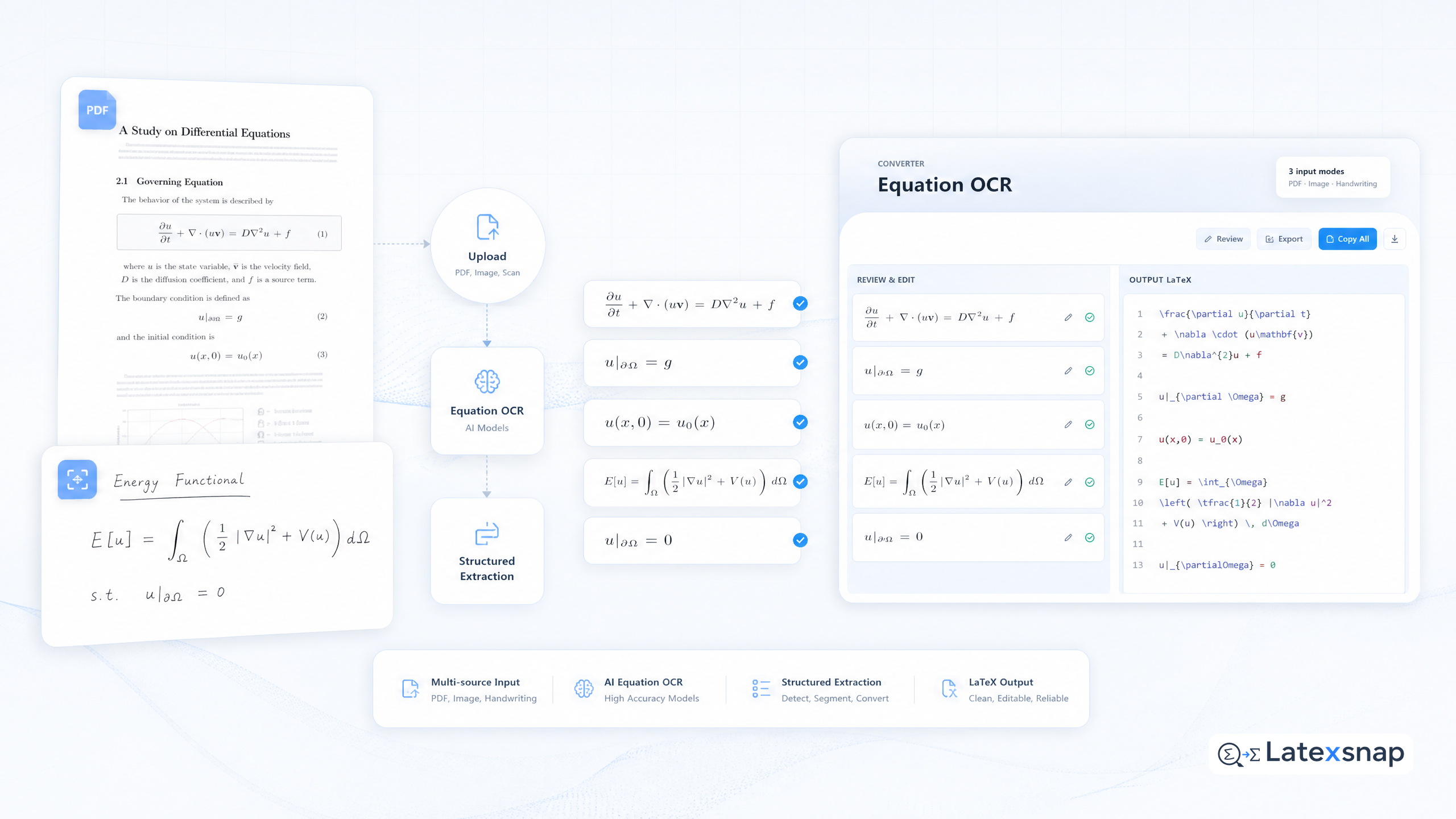
Once your document is ready, upload it to LatexSnap. The platform supports various file formats, including images, PDFs, and even handwritten notes. After uploading, LatexSnap will automatically detect and extract the equations, converting them into LaTeX code. A useful companion workflow is PDF to LaTeX Converter Workflow, especially when document OCR workflow becomes part of the review process.
For long documents, it's often helpful to process the content in smaller sections. This approach not only improves accuracy but also makes it easier to review and edit the extracted LaTeX code. LatexSnap's user-friendly interface allows you to navigate through the document and extract equations page by page or section by section.
Step 3: Review and Refine the LaTeX Code
After LatexSnap has extracted the equations, take the time to review the generated LaTeX code. While the tool is highly accurate, there may be instances where minor adjustments are needed. Pay close attention to ambiguous symbols, such as fractions, integrals, or Greek letters, which might require manual correction.
If you notice any errors, LatexSnap provides an intuitive editing interface where you can make changes directly. This step is crucial for ensuring that the final LaTeX code is error-free and ready for use in your document. When the document pipeline gets more complex, How to Write Fractions in LaTeX gives more context on LaTeX editing workflow.
Step 4: Integrate the Extracted Equations
Once you're satisfied with the LaTeX code, it's time to integrate it into your document. Whether you're working on a research paper, thesis, or technical report, LatexSnap's output can be seamlessly incorporated into your LaTeX project. The extracted equations will maintain their formatting and structure, ensuring a professional appearance.
For long documents, consider organizing the extracted equations into a separate file or section. This not only keeps your main document clean but also makes it easier to manage and update the equations later.
Tips for Best Results
To get the most out of LatexSnap, here are a few additional tips:
- Crop Quality: Always crop the image to focus on the specific section containing the equations. This helps the OCR engine process the content more accurately.
- Ambiguous Symbols: Pay close attention to ambiguous symbols, such as fractions, integrals, or Greek letters, which might require manual correction.
- LaTeX Structure: Review the generated LaTeX code to ensure it follows the correct structure and formatting.
- Manual Review: Always take the time to review the extracted equations before integrating them into your document.
Conclusion
Extracting equations from long scientific documents doesn't have to be a tedious process. With LatexSnap, you can efficiently convert images, PDFs, and handwritten notes into editable LaTeX code. By following the steps outlined in this guide, you can streamline your workflow and focus on what truly matters-creating high-quality content. For teams extending this workflow, LaTeX Beamer is a natural follow-up for LatexSnap workflow.
Whether you're a student working on a thesis, a researcher preparing a paper, or a technical writer documenting complex concepts, LatexSnap is a powerful tool that can save you time and effort. Give it a try and experience the difference it can make in your document creation process.
Convert formulas faster
Turn screenshots, handwriting, and PDFs into editable LaTeX.
