How to Keep Citations and LaTeX Equations Organized in Research Notes for Research Notes

Research notes are the backbone of academic work, yet they often become cluttered with scattered citations and complex LaTeX equations. Managing these elements effectively is crucial for maintaining clarity and efficiency in your research process. This guide will walk you through practical strategies to keep your notes organized, ensuring that your work remains both accessible and professional. For a related next step on citation and equation notes, see How to Keep Citations and LaTeX Equations Organized in Research Notes.
The Importance of Organized Research Notes
Organized research notes are essential for several reasons. First, they allow you to quickly locate and reference specific information, saving valuable time during the writing process. Second, well-structured notes facilitate collaboration, making it easier to share and discuss ideas with colleagues. Finally, organized notes contribute to a more streamlined workflow, reducing the likelihood of errors and improving the overall quality of your research.
Utilizing Citation Management Tools
One of the most effective ways to manage citations in your research notes is by using citation management tools. These tools, such as Zotero, Mendeley, and EndNote, allow you to store, organize, and format references efficiently. By integrating these tools into your workflow, you can easily insert citations into your notes and ensure that they are formatted correctly according to various citation styles. If you want to compare this with another practical angle, Convert Notes to LaTeX: A Practical LatexSnap Reading and Conversion Workflow covers LatexSnap workflow in more detail.
Setting Up Your Citation Manager
To get started with a citation manager, begin by creating an account and installing the software on your computer. Next, import your references from various sources, such as journal articles, books, and online resources. Most citation managers offer plugins for popular web browsers and reference management software, making the import process seamless.
Organizing Your References
Once your references are imported, organize them into collections or folders based on your research topics or projects. This organization will make it easier to find and retrieve specific citations when needed. Additionally, take advantage of the tagging feature in your citation manager to add keywords or notes to your references, further enhancing their accessibility.
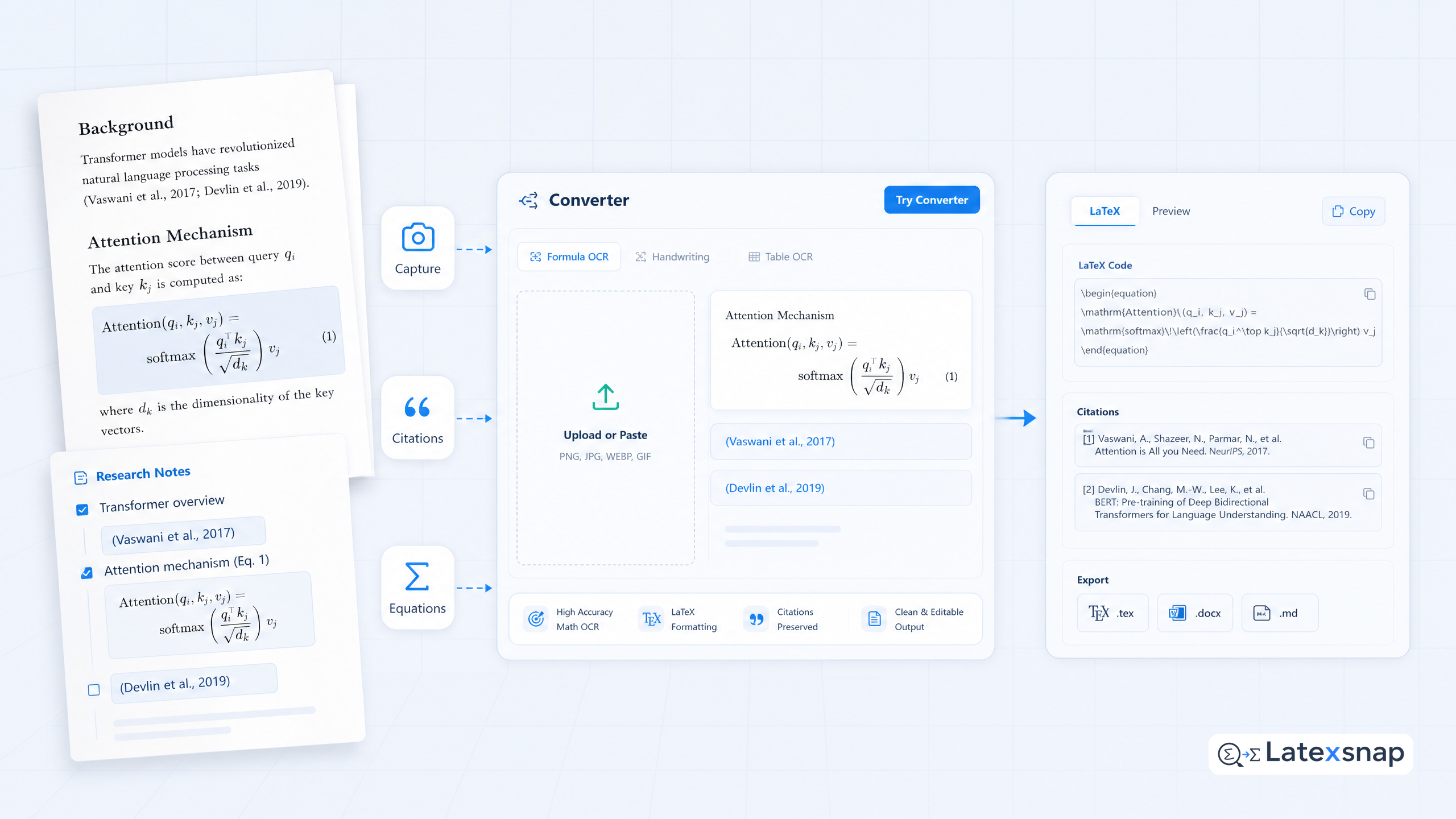
Managing LaTeX Equations in Research Notes
LaTeX equations can be a significant part of research notes, especially in fields like mathematics, physics, and engineering. However, managing these equations can be challenging if not done properly. Here are some tips to keep your LaTeX equations organized and error-free. A useful companion workflow is citation and equation notes, especially when citation and equation notes becomes part of the review process.
Using LaTeX Editors
To effectively manage LaTeX equations, consider using a dedicated LaTeX editor such as a LaTeX editor, TeXShop, or TeXworks. These editors provide a user-friendly interface for writing and editing LaTeX code, along with features like syntax highlighting and real-time compilation. By using a LaTeX editor, you can ensure that your equations are formatted correctly and are easy to read. When the document pipeline gets more complex, How to Write Fractions in LaTeX gives more context on LaTeX editing workflow.
Organizing Equations with Labels and References
To keep your LaTeX equations organized, use labels and references to link related equations. This practice not only makes your notes more readable but also helps in cross-referencing equations within your document. For example, you can label an equation with a unique identifier and then refer to it using the corresponding label in other parts of your notes.
Integrating Citations and Equations
Integrating citations and equations in your research notes requires a systematic approach. Here are some strategies to ensure that both elements are seamlessly incorporated into your notes.
Creating a Consistent Structure
Establish a consistent structure for your research notes to maintain clarity and organization. This structure should include sections for citations, equations, and any other relevant information. By following a standardized format, you can easily navigate through your notes and locate specific information when needed. For teams extending this workflow, Handwriting to LaTeX: Convert Your Notes Instantly is a natural follow-up for formula OCR workflow.
Using Cross-Referencing
Cross-referencing is a powerful tool for linking citations and equations in your research notes. By using cross-references, you can create a network of interconnected information, making it easier to understand the relationships between different concepts and ideas. Most citation managers and LaTeX editors offer built-in features for cross-referencing, simplifying the process.
Review and Refine
Regularly reviewing and refining your research notes is essential for maintaining their organization and accuracy. Here are some tips to help you keep your notes up-to-date and error-free.
Conducting Regular Reviews
Set aside time each week to review your research notes. During this review, check for any missing citations, incorrect equations, or formatting errors. Make necessary corrections and updates to ensure that your notes remain accurate and reliable.
Seeking Feedback
Don't hesitate to seek feedback from colleagues or mentors on your research notes. Their insights can help you identify areas for improvement and provide valuable suggestions for enhancing the organization and clarity of your notes.
Conclusion
Keeping citations and LaTeX equations organized in research notes is a critical aspect of effective academic work. By utilizing citation management tools, employing LaTeX editors, and following a systematic approach to integrating these elements, you can maintain clear and professional research notes. Regular reviews and feedback will further enhance the quality and reliability of your notes, ultimately contributing to more successful research outcomes.
Convert formulas faster
Turn screenshots, handwriting, and PDFs into editable LaTeX.
